
Acquire Privileges
To acquire the privileges of another Active Worlds citizen, select Privileges... from the
Login Menu:
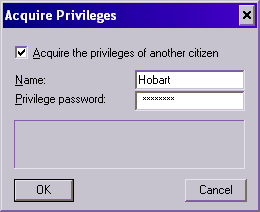
Simply check Acquire the privileges of another citizen, enter their citizen name and the
privilege password they gave you, and click OK. If the privilege acquisition succeeds, the
dialog will go away.
Once enabled, you will continue to acquire their privileges (even in subsequent Active Worlds
sessions) until you disable privilege acquisition or they change their privilege password.
To disable privilege acquisition, simply bring up this dialog again and uncheck **Acquire
the privileges of another citizen**.
Click here to learn more about sharing privileges.