
Getting Started
To visit Planet3D, simply launch the browser by double-clicking on the Planet3D icon on your desktop. You can also launch the browser by clicking on the Windows Start button, selecting Programs, then going to the Planet3D group and selecting Planet3D.
To start Planet3D, you must have an active Internet connection established. After starting the browser, you will first see a splash screen briefly as the browser is connecting to the system. Once a connection has been established, this screen will disappear automatically. If you have trouble getting connected, or receive an error message after starting Planet3D, please read our FAQs. If you cannot find an answer there, contact customer support.
At this point, it is possible that there may be a new version of the browser available. If there is, you will see a dialog box offering you an upgrade. Unless this is a forced upgrade, you can choose to accept the new version now or skip the upgrade now and get it later. Click here to learn more about automatic upgrades.
The login dialog will now come up:
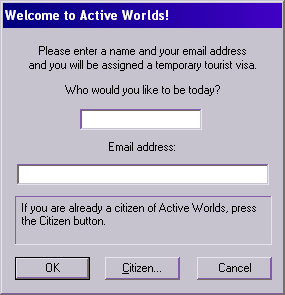
If you do not already have an Planet3D citizenship, you will need to acquire one by registering. Do this by pressing the Register... button.