
Login Dialog
The Login Dialog is accessed by selecting Citizen... from the
Login Menu:
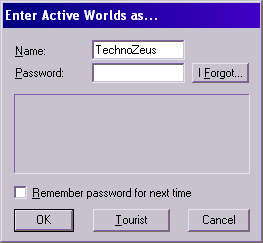
If you are like most citizens and only have a single account, you
will not normally need to ever use this dialog box. However, if you happen to have
access to multiple citizen accounts, you can use this dialog to switch between
them on the fly.
If the Remember password for next time box is checked when you use this
dialog, the account will be saved as your default identity
and your password will be saved to disk so that you will automatically be logged in
under this account the next time you start Active Worlds. If you would prefer
to type in your password by hand each time you start Active Worlds, be sure
to leave this box unchecked.
Recovering your password
If you cannot remember your password, you can recover your password automatically if you
are still receiving email at the email address you specified at Immigration time. Simply
bring up this dialog, enter your citizen name in the Name field, and press the
I forgot button next to the Password field. A new dialog box will come up asking you to confirm
the email address for this account. Enter your email address and click the OK button.
If the email address you entered matches the email address for the citizen name you specified,
an email containing your password will be sent to that address.