Citizen Attributes
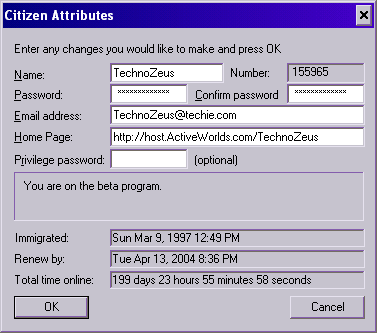
Your citizen attributes are accessed by selecting Citizen... from
the Options Menu.
Using this dialog, you can change most of the attributes of your citizen
account, including your name, your password, your privilege password, and your
email address:
Note: this dialog may not be available in some universes.
Your Citizen Number
Your citizen number uniquely identifies you, as does your citizen name. It is like an account number.
Unlike your citizen name, your citizen number cannot be changed.
Sometimes, people may ask you for your citizen number, for example if they want to
add you to a rights list in a world. If you
don't know your number, this dialog is the place to look it up.
Changing Your Name
You can change your citizen name at any time. Simply type the new name into
the Name field and press OK. If the new name is acceptable to the
system, the dialog box will go away. You cannot change your name to
a name that is currently in use by another citizen.
Note: you should use caution when changing your citizen name, even
for short periods of time. When you change your name, *your old name
becomes available again to other citizens!* Active Worlds can only
reserve one name for you at a time, so it is possible
for someone else to take your old name after you have switched to a new
name, thus preventing you from ever returning to your old name again.
Changing Your Password
You can also change your password at any time. Simply type the new
password into both the Password and Confirm password fields
and press OK. If your new password is acceptable to the system, the
dialog box will go away.
Changing Your Email Address
You can also change the email address associated with your account
at any time. Simply enter the new email address and press OK. We
encourage you to keep your email address up to date at all times.
While not required for citizenship, a valid email address allows
us to contact you if there are any problems with your account.
In addition,
this email address must be valid if you ever need to
recover a forgotten password.
Setting Your Home Page
Active Worlds 3.1 allows you to set a personal home page. Your home page is a URL to a web page that other
citizens can view if they want to know more about you. If you
don't have a home page or don't wish to make this information
available to others, simply leave this field blank.
The Privilege Password
You only need a privilege password if you want
bots
or other
citizens
to acquire the privileges of your account. Click here for more information about sharing privileges.
Be very careful who you share your privilege password with,
and under what circumstances.
If you don't want anyone to acquire your privileges, we recommend
leaving this field blank at all times.
If you do decide to share your privileges with someone,
it is generally best if you consider it
standard procedure
to change or delete your privilege password
when you are through
sharing your privileges with that person.
Note: your privilege password cannot be the same as your
login password.
Total Time Online
This field displays the total amount of time (in days, hours,
minutes, and seconds) that you have spent logged into
your current Active Worlds universe
under this citizenship since the universe
was first upgraded to version 3.1. In the main Active
Worlds universe, this date was December 1st of the year 2000.
Immigration and Renewal Dates
The Citizen Attributes dialog also shows you the date on which your
citizenship was created, in the Immigrated field, and the
date at which it will expire, in the Renew by field.
If your
renewal date is less than 30 days away, you will receive
a message from the Immigration Officer upon entry to Active Worlds,
and a Renew button will appear in the main toolbar for
extending your citizenship.