Options Menu
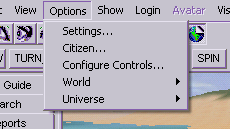
- Settings...: brings up the Settings dialog where you can adjust a wide variety of settings for your Active Worlds browser.
- Citizen...: brings up the Citizen Attributes dialog where you can change various aspects of your Active Worlds citizen account. This option may not be available in some universes.
- Configure Controls...: Opens the Keyboard Controls dialog where you can customize most of your keyboard and mouse controls. This option is new in Active Worlds 3.4.
- World ->: provides three submenus:
- Rights...: brings up the World Rights dialog where world caretakers can select who has access to various privileges in the current world.
- Ejections...: brings up the World Ejections dialog where world caretakers can examine or modify the list of IP addresses that have been blocked from accessing the world.
- Universe ->: provides four submenus:
- Citizens...: brings up the Universe Citizens dialog. You must be a universe administrator in order to access this dialog.
- Worlds...: brings up the Universe Worlds dialog. You must be a universe administrator in order to access this dialog.
- Ejections...: brings up the Universe Ejections dialog where universe administrators can examine or modify the list of IP addresses that have been blocked from accessing the universe.