
Citizen Administration
This dialog allows universe administrators to add, change, delete, and examine citizen accounts.
It is accessed from the Options Menu.
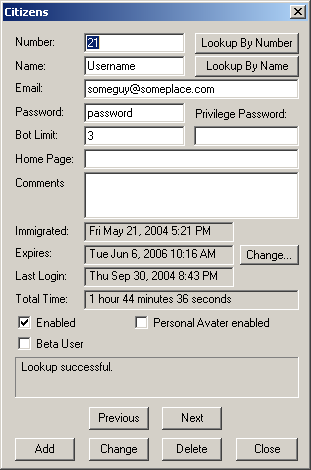
Number
This is the citizen number for the account. To look up a citizen by number, enter the
number in this field and press the Lookup By Number button.
Name
This is the citizen's name. To look up a citizen by name, enter the name here and
press the Lookup By Name button.
This is the citizen's email address. It is originally set by the citizen when he or she first immigrates
to the universe. Citizens can also view and modify this parameter at any time from the
citizen attributes dialog. This email address is used by
Active Worlds for the purpose of emailing lost passwords.
Password
This is the citizen's current login password. Citizens can modify their own login passwords at
any time from the citizen attributes dialog.
Bot Limit
This is the maximum number of bots that the citizen can have running in
the universe at any one time. This value can be set to 0 to prevent a user from running any bots.
Privilege Password
This is the citizen's current privilege password, if any.
Citizens can modify their privilege passwords at any time from the citizen attributes dialog.
Home Page
This field is new in Active Worlds 3.1 and displays the citizen's current
home page, if any. Citizens can modify their
home page at any time from the citizen attributes dialog.
Comments
This field is new in Active Worlds 3.1 and allows the universe administrator to store any
additional notes about the citizenship.
This field is for administrator reference only and is not used by Active Worlds.
Citizens cannot view the comments stored for their accounts.
Immigrated
This shows when the account was first created. It cannot be modified, although deleting and
re-adding an account will reset this value to the current date and time.
Expires
This shows when the account expires. After a citizenship expires, the citizen will have to
renew the account in order to continue using it. To adjust the expiration date, press the
Change... button to the right of the field. Note that after changing the date, you
will also have to press the citizen Change button in order to submit the change.
Last Login
This shows when the citizen last logged in to the system.
Total Time
This field is new in Active Worlds 3.1 and displays the total amount of time (in days, hours,
minutes, and seconds) that this citizen has spent logged into Active
Worlds since the universe server was first upgraded to version 3.1.
Enabled
This field is new in Active Worlds 3.1 and provides a quick way to disable an
account without having to change any other attributes of the account (in previous
versions, both the password and email address has to be changed in order to
effectively disable an account.) Once an account has been disabled, the
system will not allow anyone to log in using that account.
Beta User
This indicates whether or not the citizen is entitled to receive upgrades to beta versions
of the Active Worlds browser. It should never be enabled in any universe other than the
main Active Worlds universe run by Activeworlds Inc.
Looking Up A Citizen
Citizens can be looked up either by name or by number. To look up a citizen by number,
enter the number in the number field and press Lookup By Number. To look up
a citizen by name, enter the name in the name field and press Lookup By Name.
You can also use the Previous and Next buttons to scan through all
citizen accounts sorted by citizen number.
Adding A New Citizen
To add a new citizen, simply enter a new name, password, email address and press
the Add button. Leave the number field blank. The new citizen number will be
assigned automatically, and the bot limit, privilege password, expiration, comments,
and home page fields will initially be assigned default values. To set these
additional fields on a new account, wait for the add to complete,
then change their values and press the Change button.
Note: it is possible to create a new citizen account with a specific number, but
only if that number is lower than the highest citizen number currently assigned by
the system. For example, if the highest citizen number is currently 200,
you cannot create a citizenship with number 1001. However, if citizen 107 had been
previously deleted, a new citizen 107 could be added by specifying 107 for the number
during the add.
Changing An Existing Citizen
To change an existing citizenship, first look it up either by name or by number,
then make any desired changes and press the Change button. Note that you cannot
change the citizen number this way. To change a citizenship's number, first delete
the citizenship using the old number, then enter the new number into the number field and press
Add. Note that this will reset the Immigrated date and time for the account, and you
may also need to reset the bot limit and privilege password after changing the number.
Deleting A Citizen
To delete a citizenship, enter the number in the number field and press the Delete button.
To delete a citizen by name, enter the name in the name field and first press the **Lookup
By Name button. If the account exists you can then delete it by pressing the Delete**
button.